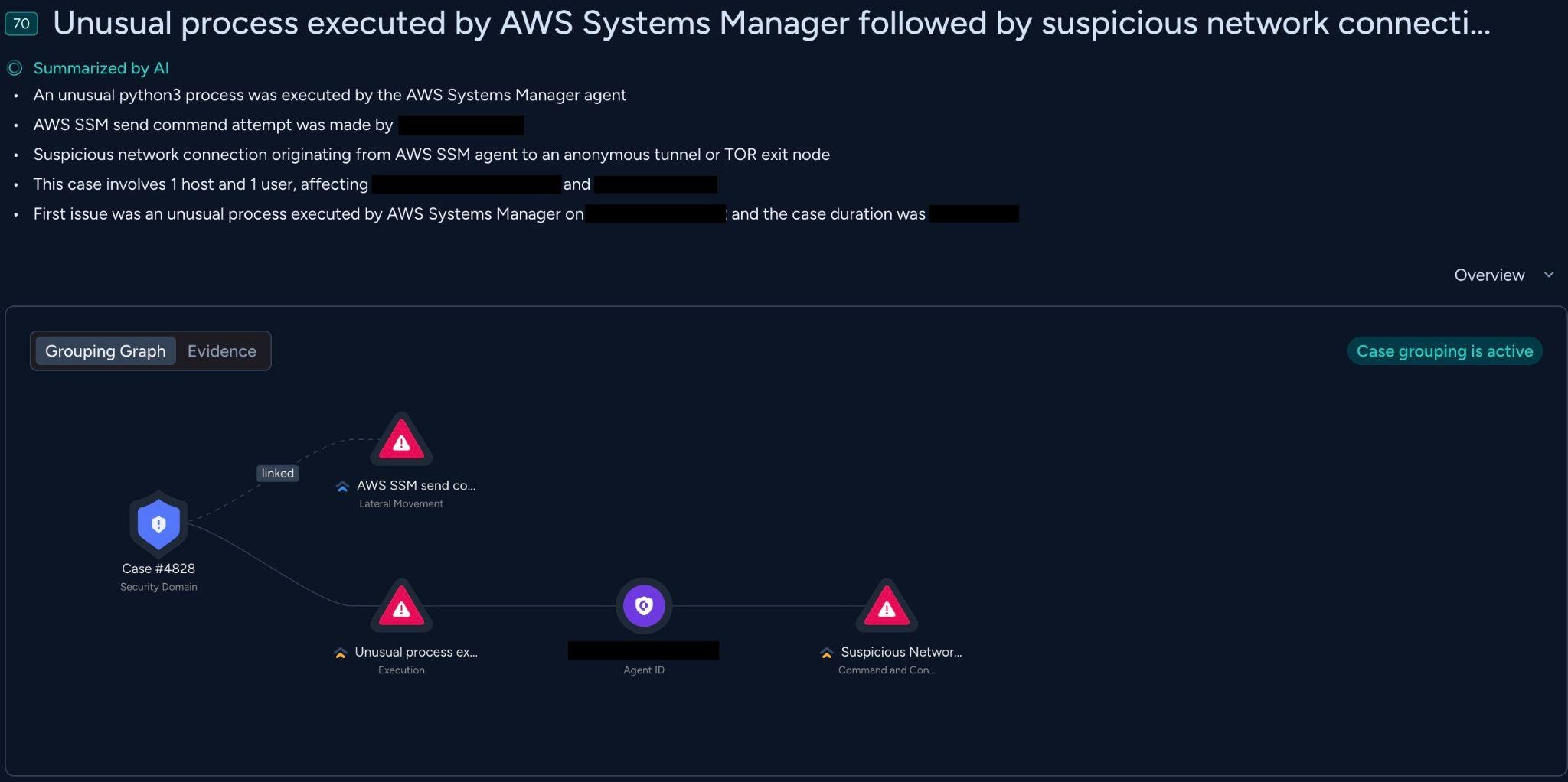
AWS Systems Manager (SSM) is a service that enables administrators to remotely manage and automate operations across EC2 instances and on-premises nodes. While SSM simplifies cloud operations, it is an attractive vector for adversaries.
In this blog post, we will analyze how threat actors with access to SSM can abuse this service for “Living Off the Cloud” attacks. By leveraging native SSM features, adversaries can execute code and move laterally while evading traditional network and endpoint security controls.
We examine on-premises compromise chains across two core attack vectors:
- Cloud to On-Premises: control plane compromise allows attackers to use SSM to push malicious commands to local servers, bypassing strict perimeter firewalls from the inside out.
- On-Premises to Cloud: compromised managed on-premises assets expose hybrid SSM credentials, allowing attackers to break out of the physical infrastructure and pivot to the connected AWS environment.
Managing On-Premises Machines in AWS
Hybrid Activation
AWS Systems Manager extends its capabilities to on-premises environments through Hybrid Activations, allowing physical servers and local virtual machines to be managed alongside cloud instances.
To configure this, an administrator generated an activation code and activation ID from AWS for the locally installed SSM agent.
Upon initialization, the SSM agent generates a unique public/private key pair directly on the host and hardware fingerprint derived from hardware identifiers, such as the machine ID, UUID, and MAC addresses.
The agent then makes an outbound call to the AWS SSM endpoint, sending the activation ID, activation code, its newly generated public key, and the hardware fingerprint. Once AWS validates these credentials it registers the machine as a managed node identified by a distinct mi-* prefix.
Authentication
Once registered, the machine maintains ongoing authentication with AWS through continuous, automated credential rotation. The SSM Agent uses its local private key to cryptographically sign a RequestManagedInstanceRoleToken API request, including its unique hardware fingerprint.
Upon receipt, AWS verifies the cryptographic signature using the public key stored during onboarding and ensures the fingerprint matches the host.
If everything matches, AWS returns temporary IAM security credentials associated with the IAM service role defined in the Hybrid Activation.
SSM Attack Surface
Before examining attack techniques, it’s worth understanding the SSM components that adversaries target most frequently.
Run Command
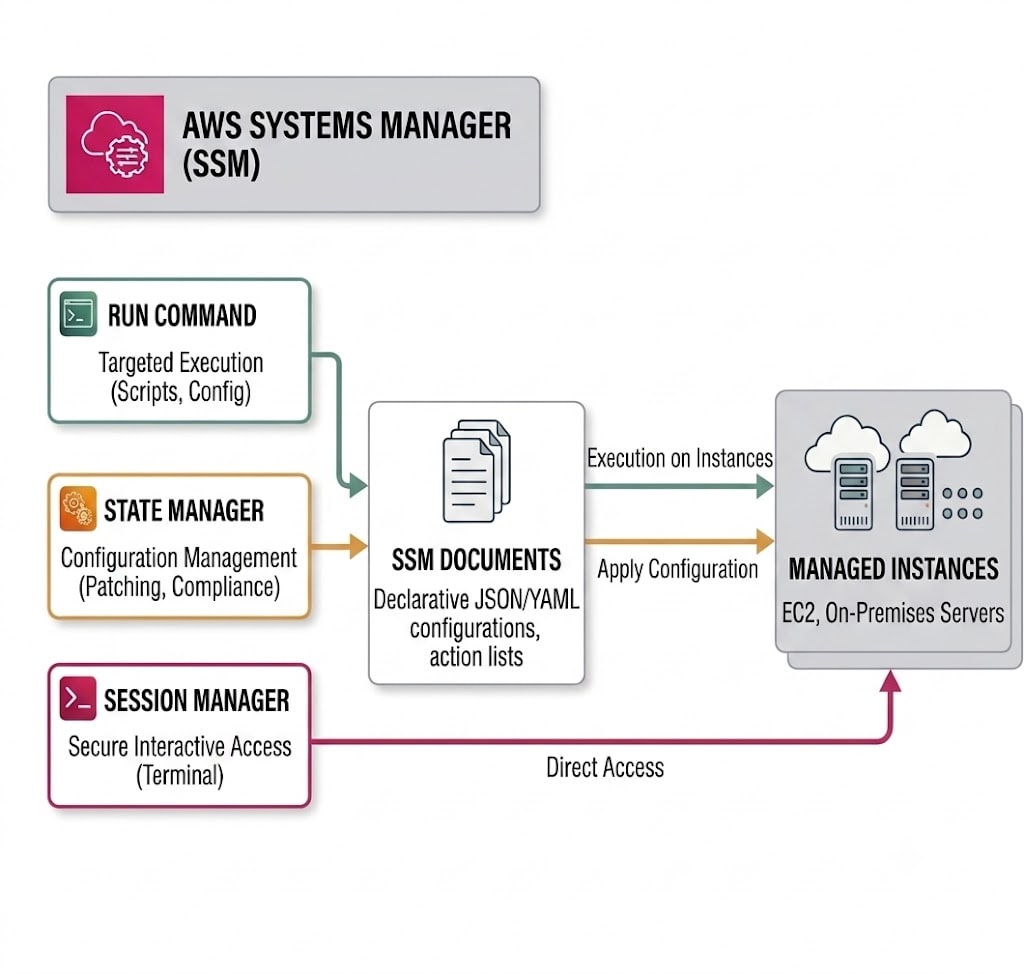
SSM documents are JSON or YAML configuration files that define the specific actions AWS SSM executes on managed nodes. They essentially act as blueprints for tasks, such as running scripts, installing software, or applying security patches.
Run Command allows execution of SSM Documents on one or more managed instances. AWS provides several built-in documents that enable code execution:
- AWS-RunShellScript - executes shell commands on Linux instances
- AWS-RunPowerShellScript - executes PowerShell commands on Windows instances
- AWS-RunPythonScript - executes Python scripts
- AWS-RunDocument - invokes other documents
- AWS-RunRemoteScript - downloads and executes scripts from S3 bucket or GitHub
Session Manager
Session Manager provides interactive shell access to managed instances through the SSM agent. It relies on the local SSM agent installed on a managed instance establishing an outbound WebSocket connection to the SSM service endpoint.
When an authorized user initiates a session via the AWS Console (or CLI), AWS tunnels the interactive shell data through this existing outbound channel. From an attacker’s perspective, this is an ideal lateral movement channel, as it eliminates the need for inbound ports, bastion hosts, and key management, by relying solely on IAM policies.
State Manager
State Manager applies SSM Documents to instances on a schedule or on demand through associations. For example, the AWS-GatherSoftwareInventory document is particularly interesting to attackers as it enumerates all installed software on managed instances, providing a map of the target environment’s software.
SSM Attack Vectors
In this section, we break down two scenarios abusing SSM. First, we’ll walk through a cloud-to-on-premises attack that achieves code execution on a local machine, followed by an on-premises-to-cloud pivot that harvests valid AWS credentials straight from a compromised managed server.
Control Plane to On-Premises
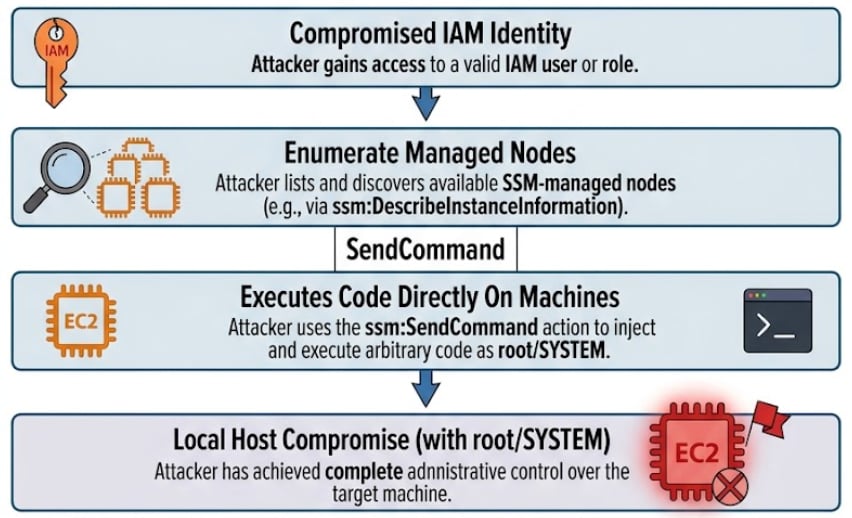
In this scenario, a threat actor has successfully compromised an identity in AWS (via a leaked access key, a misconfigured IAM role, etc.), and leverages SSM to compromise on-premises managed servers.
Initial Access & Reconnaissance
Since cloud environments are more exposed to the Internet by design, attackers often find them easier to target and exploit. This may be used as a pivot to the corporate network using organization endpoints managed by SSM.
The attacker authenticates to the AWS API using stolen IAM credentials. They immediately perform reconnaissance to map out EC2 instances and other managed machines in the AWS account, often by invoking API calls such as:
- DescribeInstanceInformation, DescribeInstanceProperties - Lists all online managed nodes, including their OS version, IP addresses, and agent status.
- ListAssociations - Identifies automated tasks or scripts scheduled.
- GetInventory - Gather host details such as OS, installed applications, network configuration ,etc.
Command Execution
Access to a managed instance typically requires network connectivity and valid SSH or RDP credentials. However, AWS Systems Manager Run Command bypasses these requirements. Because the SSM agent maintains an outbound connection to the AWS SSM endpoint over HTTPS, an attacker with permission to invoke SendCommand can execute commands on the instance without requiring inbound network access or operating system credentials.
The attacker uses a document like AWS-RunShellScript or AWS-RunPowerShellScript to push commands to one or multiple instances simultaneously.
|
1 2 3 4 |
aws ssm send-command \ --instance-ids i-0123456789abcdef0 \ --document-name "AWS-RunShellScript" \ --parameters 'commands=["whoami","hostname"]' |
An attacker can target instances based on AWS resource tags. By executing a single API call targeted, for example, at Key=Environment,Values=Production, they can simultaneously deliver a malicious payload to every managed node matching that tag.
|
1 2 3 4 |
aws ssm send-command \ --targets "Key=tag:Environment,Values=Production" \ --document-name "AWS-RunShellScript" \ --parameters 'commands=["whoami"]' |
Local Host Compromise
Because the SSM Agent natively runs with administrative privileges, any command executed via SendCommand runs in elevated context (root or SYSTEM). From here, the attacker may pivot through the internal network and target sensitive data either by installing malware, disrupting logging, or harvesting local credentials.
On-Premises to Control Plane
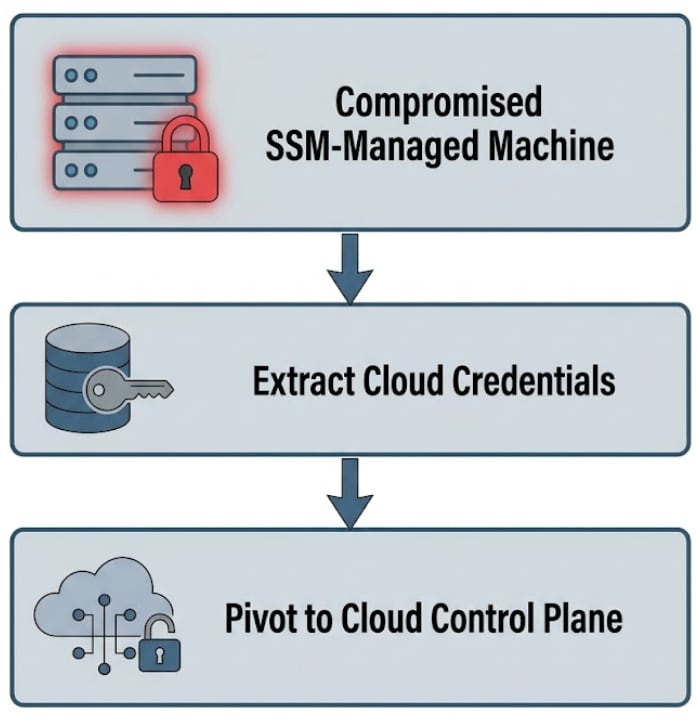
In this reverse scenario, the attacker begins with a foothold on a machine managed by SSM (either a cloud instance or a hybrid node), and uses SSM credentials to escalate into the control plane.
Extracting Cloud Identity Tokens
Once inside a managed node, the attacker is interested in retrieving temporary AWS credentials assigned to that node to pivot into the cloud. On-premises hybrid nodes use the SSM agent configured via a Hybrid Activation, which stores its registration and private keys locally. For example, on Linux systems, these files are located at /amazon/ssm/Vault/Store/RegistrationKey and /amazon/ssm/Vault/Store/InstanceFingerprint. The temporary token of the hybrid node is stored in /root/.aws/credentials. An attacker with local root can extract these credentials to invoke AWS API requests as the node’s IAM role.
Cloud Discovery from the Host
Using the extracted AWS credentials, the attacker tests their permissions to see what parts of other AWS services they can reach. They usually access high value targets such as S3 buckets, RDS databases, or secrets from AWS Secrets Manager.
Why Single Source Detection Falls Short
The individual techniques described above are valuable on their own, but they reach their full potential when correlated across data sources and time.
Cloud audit logs alone tell you that an identity called SendCommand with AWS-RunPowerShellScript targeting three instances. They don’t tell you that the resulting script downloaded a remote access tool, and established a C2 channel.
Endpoint telemetry alone tells you that amazon-ssm-agent spawned powershell.exe, which spawned curl.exe to download an executable. It doesn’t tell you which cloud identity initiated the command or whether that identity performed reconnaissance beforehand.
Linking the cloud side SendCommand API call to the host side process execution events provides full attribution. The identity, the command, and its impact are visible in a single alert context.
Summary
Effectively detecting SSM-based attacks requires correlating cloud telemetry with endpoint telemetry. This approach provides full visibility into the attack chain - from the initial cloud API command to the final impact on the host, ensuring that "Living Off the Cloud" techniques do not go unnoticed.
Cortex Cloud® offers a comprehensive security solution with specialized detections for SSM-related attacks, enabling security analysts to effectively detect, respond to suspicious activity while ensuring seamless incident investigation and management. The complete list of these detections can be found under the SSM Remote Management Analytics tag.
Check out Cortex Cloud® here to learn more about our security solutions.